1. What is Weblogic?
Answer: WebLogic is a J2EE application server and also an HTTP web server by Oracle, for Unix, Linux, Microsoft Windows, and other platforms. WebLogic supports Oracle, DB2, Microsoft SQL Server, and other JDBC-compliant databases.
2. What is SSL in WebLogic?
Answer: Secure Sockets Layer (SSL) provides secure connections by allowing two applications
connecting over a network connection to authenticate the other’s identity and by encrypting the data
exchanged between the applications. Authentication allows a server and optionally a client to verify the
identity of the application on the other end of a network connection. Encryption makes data transmitted
over the network intelligible only to the intended recipient
3. How many ways to start and stop WebLogic servers?
Answer:
There are many ways to start & stop WebLogic Admin and managed servers:
You can start and stop Admin Server using :
1) Script
2) “Java Weblogic.server “command(The WebLogic.Server class is the main class for a WebLogic Server
instance)
3) From startup option on windows
4) WLST with or without node manager
You can start managed servers using:
1) scripts
2) admin console
3) using WLST
4) using node manager
5) java WebLogic.server command( The WebLogic.Server class is the main class for a WebLogic
Server instance )
4. What is the difference between T3 and HTTP protocol?
Answer: WebLogic uses the T3 protocols for internal and external connections to the servers. The T3 protocol often is used in WebLogic implementation of RMI. Proprietary of WebLogic Server.
Http protocols are used primarily for HTTP communication between the browser and the webserver. Standard follows the W3C (World Wide Web Consortium).
Note: All of these protocols are, by default, multiplexed over the same connection to the server’s address and port. So you can access a web page hosted by the server using a URL such as An external client can set up an initial JNDI context to a server using the URL t3://host: port/. All that has changed is the protocol over which the client must communicate with the server.
5. What are the States of the Weblogic Server?
Answer:
There are 9 states of the server which are given below
Shutdown
Starting
Standby
Resuming
Running
Suspending
Shutting down
Failed
6. How Administration Server And Managed Servers Will Interact?
Answer: The Administration Server stores the master copy of the domain configuration, including the configuration for all Managed Servers in the domain. Each Managed Server stores a local copy of the domain configuration file. When a Managed Server starts, it connects to the Administration Server to synchronize the configuration. When the configuration is changed, the Administration Server sends the changed configuration to the Managed Servers.
7. What Is Boot?properties File In Weblogic Server?
Answer: boot.properties is the file used by admin or managed server during startup for username and password. it exist under your domain/servers/server_name/security folder.
8. What Is Config.xml?
Answer: config.xml is the central configuration repository for a domain. every resource you have configured from the admin console or by command line or by any other tool registered under this file.WLS 9.x onwards, this file contains references to other xml configuration files also those are under your domain/config folder ( further subfolder under it for respective resources ).
9. What Is Multicast And Unicast In Weblogic?
Answer: Multicast: Multicast is easier to explain over Unicast. Multicast is a broadcast UDP option for sending a packet/announcement over to a group that is listening on a specific multicast address and port over which the announcement is sent. There is a defined range for valid Multicast address (224.0.0.1 to 239.255.255.255). Everyone listening on the given address hears the announcement just like following a Twitter post. Some limitations with Multicast is the TTL (time to live) across machines/subnets/routers needs to be adjusted and the routers configured to retransmit the multicast packet across subnets
Unicast: Unicast is more of a point to point UDP option to send the packet to a specific member and not everyone. That way, unicast is more of a private conversation between two individuals while multicast is more of a shout to a group or room. Both are UDP based, so there can be losses, unlike TCP that handles retransmissions on message loss. But Unicast can span across routers and does not have to worry about TTL without the everyone hearing the announcement. So, Network Admins, in general, prefer to go with Unicast over Multicast for these reasons.
10. Explain The Methods For Providing User Credentials For Starting The Server?
Answer: At the time of the creation of domain, the wizard for setting configuration asks for the details like user name, password, etc. from the user who is logging in for the first time as an administrator. If the domain is created in development mode, the configuration wizard saves the encrypted password as well as the username inside an identity file. This file is available for reference during the time of booting so that in the absence of this file, the system can prompt the user for the purpose of entering credentials. A new boot – identity file can be created if you want to change the user credentials or else if you are having the requirement of creating a domain in the production model.
11. What is the easiest way to set the classpath?
Answer: WebLogic Server installs the following script that you can use to set the classpath that a server requires:
WL_HOME\server\bin\setWLSEnv.cmd (on Windows)
WL_HOME/server/bin/setWLSEnv.sh (on UNIX)
12. How many types do you configure managed server in WebLogic server?
Answer:
Three types
1)Domain Configuration Wizard
2)Administration Console
3)Weblogic Scripting Tool
13. How do you set the classpath?
Answer: WebLogic Server installs the following script that you can use to set the
classpath that a server requires:
WL_HOME\server\bin\setWLSEnv.cmd (on Windows)
WL_HOME/server/bin/setWLSEnv.sh (on UNIX)
14. How does a server know when another server is unavailable?
Answer: WebLogic Server uses two mechanisms to determine if a given server instance is unavailable. Each
WebLogic Server instance in a cluster uses multicast to broadcast regular “heartbeat” messages that
advertise its availability. By monitoring heartbeat messages, server instances in a cluster determine when
a server instance has failed. The other server instances will drop a server instance from the cluster if
they do not receive three consecutive heartbeats from that server instance
WebLogic Server also monitors socket errors to determine the availability of a server instance. For
example, if server instance A has an open socket to server instance B, and the socket unexpectedly closes,
server A assumes that server B is offline
15. How Can Port Number Be Checked?
Answer: Port number can be checked by using netstat-na|grep connected.
16. What Are The Various Types Of Weblogic Installations?
Answer:
The WebLogic installation usually occurs in three different modes which are:
Graphical mode
Console mode
Silent mode.
17. Explain The Term Clustering?
Answer: Clustering is the process of grouping the servers together for accomplishing high percentage of scalability and availability.
18. What Is The Purpose Of Clustering?
Answer: The major goal of performing the process of clustering is to make high scalability as well as the availability of the servers possible. This process also helps in balancing the load in a proper manner and also accomplishes failover.
19. How Can Cluster Communication Occur?
Answer: The communication through cluster is made possible by the multicast IP as well as a port by the process of sending periodic messages which are normally called as heartbeat messages.
20. We often see BSU when using WebLogic. What is the meaning of BSU?
Answer: Oracle bought Weblogic from BEA. BSU Stands for Bea Smart Update. This utility is used to apply the WebLogic Server Patches. In simple terms, it is the first letter of the name of founders Bill Coleman, Ed Scott, and Alfred Chuang.
21. Is There Any Possibility For Starting Managed Server During The Absence Of Administrator Server?
Answer: The usual process is that in case of any difficulty for the management server to get connected to any administration server at the time of start-up, there is an option for the managed server to retrieve the configuration related to it from the configuration files as well as other files involved. The information thus retrieved cannot be altered and it is possible only when the administration server is really available. When the administration server is unavailable, then the managed server enters into its independence mode for carrying out its operations.
22. What are the modes of operation for Weblogic server domains?
Answer:
There are two modes
Development mode:
You use development mode while you are developing your applications. Development mode uses a relaxed security configuration and enables you to auto-deploy applications.
Production mode:
You use production mode when your application is running in its final form. A production domain uses full security and may use clusters or other advanced features.
23. What is Horizontal and vertical clustering?
Answer: There are two methods of clustering Horizontal and Vertical.
Horizontal clustering: involves running multiple Java application servers that are run on two or more
separate physical machines.
Horizontal scaling is more reliable than vertical scaling since there are multiple machines involved in the
cluster environment, as compared to only one machine
Vertical clustering: however, consists of multiple Java application servers on a single physical machine.
With vertical scaling, the machine’s processing power, CPU usage, and JVM heap memory configurations
are the main factors in deciding how many server instances should be run on one machine.
24. What is the Basic Components of Weblogic Server?
Answer: These are the basic WebLogic components
1)Domains
2)Admin Server
3) Managed Server
4) Node Manager
5) Weblogic Server Cluster
25. What are stating modes are available in Weblogic Server?
Answer:
There are three starting modes are available:
1) Stage mode: Administration Server copies the deployment files from their original location on the
Administration Server machine to the staging directories of each target server
2) External Stage: target servers deploy using local copies of the deployment files, here the
Administration Server does not automatically copy the deployment files to targeted servers in
external_stage mode; instead, you must copy the files to the staging directory of each target server before
deployment.
3) No Stage: The Administration Server does not copy deployment unit files; instead, all servers deploy
using the same physical copy of the deployment files, which must be directly accessible by the
Administration Server and target servers
26. What is a Thread dump? How will you take in Unix/Linux and windows?
Answer:
A Java thread dump is a way of finding out what every thread in the JVM is doing at a particular
point in time. This is especially useful if your Java application sometimes seems to hang when running
under load, as an analysis of the dump will show where the threads are stuck.
1) Linux : kill -3 2) Windows (console mode): crtl+break
3) Windows (service): basic -dump -svc name:mydomain_myserver
27. What are the supported installation modes for WebLogic Server?
Answer:
Graphical mode, console mode, and silent mode.
28. What is the function of T3 in WebLogic Server?
Answer:
The enhancements support for WebLogic Server messages is provided by T3. These enhancements include object replacement, which works in WebLogic Server clusters’ context and HTTP. Java Object Serialization, RMI predation is done by T3. T3 is a superset of java Object. Serialization and RMI can be done over T3.
Between WebLogic Servers, and between programmatic clients & a WebLogic Server cluster, T3 is mandated. To communicate between processes and WebLogic Server, the protocols HTTP and IIOP can be used and optional. The HTTP is used to communicate between a browser and a WebLogic Server. The IIOP is used to communicate between an Object Request Broker and WebLogic Server
29. How do stubs work in a WebLogic Server cluster?
Answer: The enhancements support for WebLogic Server messages is provided by T3. These enhancements include object replacement, which works in WebLogic Server clusters’ context and HTTP. Java Object Serialization, RMI predation is done by T3. T3 is a superset of java Object. Serialization and RMI can be done over T3.
Between WebLogic Servers, and between programmatic clients & a WebLogic Server cluster, T3 is mandated. To communicate between processes and WebLogic Server, the protocols HTTP and IIOP can be used and optional. The HTTP is used to communicate between a browser and a WebLogic Server. The IIOP is used to communicate between an Object Request Broker and WebLogic Server.
30. Can We Start A Managed Server If The Administration Server Is Unavailable?
Answer: By default, if a Managed Server is unable to connect to the specified Administration Server during startup, it can retrieve its configuration by reading a configuration file and other files directly. You cannot change the server’s configuration until the Administration Server is available. A Managed Server that starts in this way is running in Managed Server Independence mode.
31. What Is A Weblogic Server Cluster?
Answer: A WebLogic Server cluster consists of multiple WebLogic Server server instances running simultaneously and working together to provide increased scalability and reliability.
A cluster appears to clients to be a single WebLogic Server instance. The server instances that constitute a cluster can run on the same machine, or be located on different machines.
You can increase a cluster’s capacity by adding additional server instances to the cluster on an existing machine, or you can add machines to the cluster to host the incremental server instances.
Each server instance in a cluster must run the same version of WebLogic Server.
32. Explain about WebSphere MQ Real-time transport?
Answer:
WebSphere MQ Real-time Transport is a lightweight protocol optimized for use with nonpersistent messaging.
It is used by JMS clients and provides high levels of scalability and message throughput.
WebSphere MQ Real-time Transport is ideal for applications where large numbers of messages need to be sent or where messages need to be sent to large numbers of client applications.
The WebSphere MQ Real-time Transport does not provide any facilities for persistent messaging or durable subscriptions.
33. Explain the concepts and capabilities of ANT?
Answer: Open: Ant is an open source project available under the Apache license. Therefore, its source code can be downloaded and modified. Additionally, Ant uses XML build files which make its development easy.
Cross-Platform: Use of XML along with Java makes Ant the perfect solution for developing programs designed to run or be built across a range of different operating systems.
Extensible: New tasks are used to extend the capabilities of the build process, while build listeners are used to helping hook into the build process to add extra error tracking functionality.
Integration: As Ant is extensible and open, it can be integrated with any editor or development environment easily.
34. What is C-HTML?
Answer: Compact-HTML (a subset of HTML for small information devices) was created by Japan-based Access Company and was accepted by the W3CM in 1998.
Devices like cellular phones have several hardware restrictions like small memory, low power CPUs, small mono-color display screens and restricted input methods.
CHTML does not support JPEG images, tables, image maps, multiple fonts and styles of fonts, background colors and images, frames, style sheets and more than two colors, typically black and white.
The basic operations can be done by a combination of four buttons:
cursor forward
cursor backward
select
back/stop
35. What is the difference in the web.xml and weblogic.xml?
Answer: An application-specific XML-based deployment descriptor file named web.xml, which lists your application’s J2EE components and their configurations as J2EE modules. Each J2EE module is a collection of one or more J2EE components of the same container type (Web or EJB) that are represented by one component deployment descriptor for that type in the web.xml file.
A WebLogic-specific deployment descriptor file named weblogic.xml, which defines how named resources in the web.xml file are mapped to WebLogic Server resources. Examples of weblogic.xml attributes include HTTP session parameters, HTTP cookie parameters, JSP parameters, resource references, security role assignments, and container attributes.
36. How to change from default JVM to others?
Answer: When you upgrade a domain to WebLogic Server 8.1, consider upgrading your JVM to JRockit. WebLogic JRockit is a JVM designed for running server-side applications in Windows and Linux running on Intel architectures. For server-side applications, JRockit has these advantages over other virtual machines:
It employs adaptive optimization, which detects and removes bottlenecks in the deployed application.
It is designed specifically for the special requirements of server-side applications, which tend to be parallel and thread-intensive, to run for longer periods of time, and not to use graphical interfaces.
You can monitor JRockit using the WebLogic Server Administration Console.
Steps to change:
In the server start scripts, set JAVA_HOME (or equivalent) shell variables to point to the JRockit root directory. For example, change:
@rem Set user-defined variables.
set JAVA_HOME=WL_HOME\jdk131
where WL_HOME is the WebLogic Server 7.0 installation directory, to
@rem Set user-defined variables.
set JAVA_HOME=WL_HOME\jrockit81_141_02
where WL_HOME is the WebLogic Server 8.1 installation directory.
Change the domain’s config.xml to use the JRockit javac.exe. For example, change
JavaCompiler=”WL_HOME\jdk131\bin\javac”
where WL_HOME is the WebLogic Server 7.0 installation directory, to
JavaCompiler=WL_HOME\jrockit81_141_02\bin\javac”
where WL_HOME is the WebLogic Server 8.1 installation directory.
Remove from server start scripts any switches specific to the Sun JVM. For example, from the start command:
echo on “%JAVA_HOME%\bin\java” -hotspot …. WebLogic.Server delete “-hotspot”
37. How to make a managed server?
Answer: v Backup the configuration by rename config.xml with config.xml_date
v Configure the changes in the start managedWebLogic.sh /cmd with WebLogic home and java home and give the admin servers URL updated
v Go to WebLogic admins console and add a managed server and give the IP and port of the managed server. all the changes confirmed then start the server using start managedWebLogic.sh script present in the domain bin.
38. What is a license file?
Answer: now you need to register with Oracle Support ID to get updated license xml file.
39. How to configure a DB connection pool?
Answer:
Choose the DB type (Oracle, Sybase, Mysql, etc…)
Then choose the driver type for the DB.
Give the connection pool name.
Give the DB Service ID, schema name and password.
Then it will ask for testing the connection pool/DataSource.
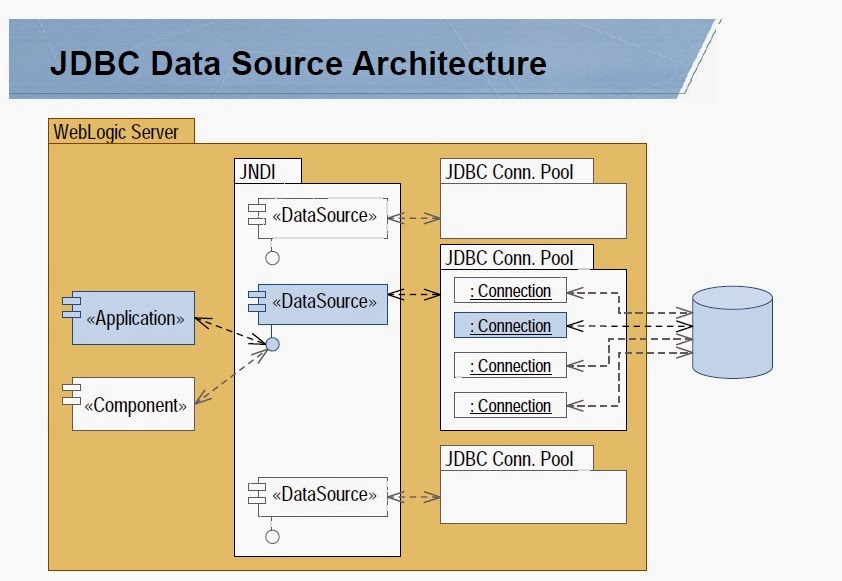
After a successful connection, it will ask you to create and deploy the connection pool target to server or cluster. After creating a new connection pool always point the JDBC store to the connection pool created. This is required because A JMS JDBC store will be used for persistent messaging.
After each JDBC connection, we have to restart the server if there are startup classes dependancy exists otherwise no restart required in WebLogic 9.x and higher versions.
40. What is JNDI?
Answer: Java Naming and Directory Interface
Applications use naming services to locate objects data sources, EJBs, JMS, MailSessions, and so on within the WebLogic domain. A naming service associates names with objects and finds objects t3 protocol will be used. (The RMI registry is a good example of a naming service.)
JNDI provides a common-denominator interface to many existing naming services, such as LDAP (Lightweight Directory Access Protocol) and DNS (Domain Name System). These naming services maintain a set of bindings, which relate names to objects and provide the ability to look up objects by name. JNDI allows the components in distributed applications to locate each other.
The WebLogic Server implementation of JNDI supplies methods that:
Give clients access to the WebLogic Server naming services
Make objects available in the WebLogic namespace
Retrieve objects from the WebLogic namespace
41. What Is The Advantage Of Clustering?
Answer:
WebLogic clustering offers three important benefits:
1. Scalability: The capacity of an application deployed on a WebLogic Server cluster can be increased dynamically to meet demand. You can add server instances to a cluster without interruption of service — the application continues to run without impact to clients and end-users.
2. Load balancing: The ability to distribute requests across all members of the cluster, according to the workload on each server.
3. High availability: A mix of features that ensure applications and services are available even if a server or machine fails. Clients can continue to work with little or no disruption ina highly available environment. WebLogic achieves high availability using a combination of features: replication, failover, and migratable services.
42. What is extended deployment in WebSphere?
Answer:
WebSphere Extended Deployment delivers enhanced Qualities of Service with features for optimizing IT resources.
The suite comprises of 3 products:
WebSphere Virtual Enterprise:
It increases flexibility and agility to ensure business process integrity, improve service, application performance, and better manage health.
It provides application infrastructure virtualization capabilities that lower costs required to create, manage, and run enterprise applications and an SOA environment.
WebSphere eXtreme Scale:
It is an essential IBM software technology for conducting extreme transaction processing.
It allows business applications to process exceptionally large volumes of transactions with extreme efficiency and linear scalability.
It provides transactional integrity and transparent failover to ensure high availability, high reliability, and constant response times.
It operates as an in-memory data grid that dynamically caches, partitions, replicates, and manages application data and business logic across multiple servers.
Compute Grid:
Enables the scheduling, execution, and monitoring of batch type jobs with enhanced service policy and workload management.